How to: Use and publish Azure Artifacts using Azure Pipelines
Guia completo para criar, publicar e consumir pacotes NuGet/npm privados em aplicações .NET Core containerizadas com Docker no Azure DevOps.

How to: Use and Publish Azure Artifacts using Azure Pipelines with .NET Dockerized Applications
Have you heard of Azure DevOps artifacts? Azure DevOps Artifacts is a relatively new tool for those using Azure DevOps services, which allows you to create and share feeds from the top package managers used today: Maven, NuGet, and npm from public or private sources.
The main advantages of this approach are:
- Code reuse across different projects
- Package version management between users and all advantages of versioning
- Integration with Azure Pipelines
In this post, I will explain how to use and automate NuGet package publishing using a .NET Core project as a package consumer and provider.
Publishing your first package
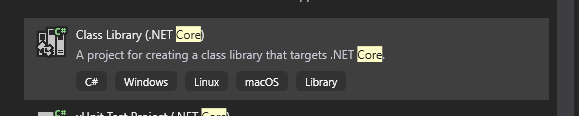
For library creation, we will create a simple class library project
Versioning
Packages follow the package number described in the .csproj file, it is recommended to use the semantic versioning also known as semver if any changes occur
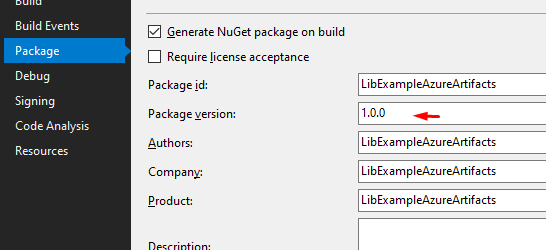
And if you add the following tags -alpha or -beta or -rc, it turns into a bundle of pre-release
Pre-release versions in NuGet packages
Your azure-pipelines.yml file should look like this:
https://medium.com/media/ec49cdc45f2d327b389fe2e8591d91eb/hrefBe aware of the feed name created within the Azure DevOps portal. In the last push step, change it to the name of the feed you created in the portal
Using private repositories via Azure Pipelines
A big problem, so far, is connecting Azure DevOps Artifacts feeds with .NET applications. Depending on your context, they should be private. I will show three ways to solve this problem, why two of them don’t work very well and why I personally recommend going for the third alternative.
- Using NuGet.Config
https://medium.com/media/3af4a873e3eeed9482a024537454bc08/hrefAdd this file to version control in your solution path and packages can be published
Problems
- Token access keys will be versioned in your repository (security)
- Access token keys have an access deadline of up to 1 year (maintenance)
2. Detach your dotnet restore & dotnet build
In Azure Pipelines, before your build task:
- If you use the command NuGet, use the step (NuGetCommand@2) and specify the command restore.
- If you use dotnet CLI, use the step (DotNetCoreCLI@2) and specify for the command restore
For both scenarios, the build will create the same NuGet.Config file already mentioned above, only in the image created from build (it won’t be added to version control) and will use it in the restore activity, either via dotnet CLI or NuGet command
Problems
- If, for some reason, you need to run a dotnet build or dotnet publish, in another task the build/publish task will fail, because there is an implicit dotnet restore command
- in the above case, in every step where we run either of these two commands, we will need to pass the --no-restore flag
3. Azure Credential Provider
In this approach you will need to:
- Download the latest version of credential provider
- Use the *NUGET_CREDENTIALPROVIDER_SESSIONTOKENCACHE_ENABLED *and *VSS_NUGET_EXTERNAL_FEED_ENDPOINT *environment variables
https://medium.com/media/90025287fe92a6acbd2f3bcf5dcb4009/hrefhttps://medium.com/media/5f122f4f316f5ba53cc0944f2039c1e1/hrefAdvantages
- Use of System.AccessToken pre-defined variables, which provide temporary security keys at build time
- Cache utilization, if any access token was already created
- Versioning key does not stay in versioned files
- You continue to versioning Nuget.Config file, but you don’t have to expose username and password data with access of your repository, just the url of your feed
Points of attention
- The username used does not actually exist, it is just a unique user identifier to use while the session key is created by the credential provider
Conclusion
Azure Artifacts and Azure Pipelines are powerful tools that, if well used, can be your allies in package management for internal or external projects that use libraries from these packages registries (NuGet, Maven, npm, phyton packages). My main advices are:
- Always keep package version updated and use a version number scheme
- Enable retention policies to automatically clean up old package versions
- Only push stable packages to the registry. To do this, use the concept of views in Azure Artifacts
- Each repository should only reference one feed. To do this, use upstream sources
- If you’re looking for some advanced concepts and set-up a continuous delivery for nuget packages in Azure Artifacts i recommend you to follow these instructions
Gustavo Miranda
Software Engineer @ Uber • ex @CI&T • @gstvribs
Global-Scale Software Engineering & Platform Architecture